
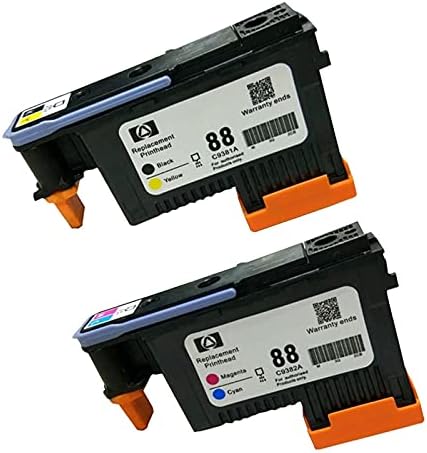
InkPro Inkpro Compatible HP 88 printhead Set C9381A C9382A for OfficeJet Pro K550 L7780 L7680
Product details
| Management number | 226251600 | Release Date | 2026/05/09 | List Price | $15.18 | Model Number | 226251600 | ||
|---|---|---|---|---|---|---|---|---|---|
| Category | |||||||||
To prevent the static affect the stability of the chip, please do not touch the chip. - Before installing the new print head, please make sure printer works properly (Otherwise the main board may burn it which causing the printer refusing to print). Then remove the cover and the protective film of the print head to install. - Use the printer automatic cleaning function to clean the print head 2 to 3 times to ensure smooth operation of the printer. - If the print head do not recognize your printer at the first time, please use eraser or cotton swab to clean the chips softly, then re-install the print head and restart the printer. - The print head must be used with a suitable ink cartridge. Dye and pigment inks cannot be mixed. - Each print head has pass tested before we send it to you. please use it in confidence.
- Compatibility: Adopting the latest smart chips. 100% printer test for each Printhead to ensure full working condition and a superior print quality.
- 100% Satisfaction Guarantee 60 days Warranty
- For Printers: HP Officejet Pro K550 K550dtn K550dtwn K5400 K5400dn K5400dtn K5400n K5400tn K8600 K8600dn K8600dtn L550 L580 L650 L7000 L7400 L7480 L7550 L7555 L7580 L7590 L7650 L7680 L7681 L7710 L7750 L7780
| UPC | 604190376954 |
|---|---|
| ASIN | B0948G2N7F |
| Brand | InkPro |
| Color | Cyan, Black, Magenta |
| Ink Base | Water |
| Ink Colour | Black, Cyan, Magenta |
| Model Name | 88ph-2 |
| Page Yield | 500 |
| Unit Count | 1 Count |
| Print media | Paper (plain) |
| Manufacturer | Inkpro |
| Model Number | 88ph-2 |
| Model Series | OfficeJet Pro |
| Printer Type | Inkjet |
| BuiltIn Media | Print head |
| Warranty Type | limited |
| Mfr Part Number | 88ph-2 |
| Number of Items | 1 |
| Compatible Devices | Printer |
| Printer Output Type | multiple colors |
| Compatibility Options | Compatible |
| Specific Uses For Product | Office printing |
| Printer Model Compatibility | HP Officejet Pro L7680 |
| Other Special Features of the Product | Easy Clean Print Head |
Bestseller ranking
Nationalism






Customers who viewed this product also viewed
Inkjet Ink Cartridges


Correction of product information
If you notice any omissions or errors in the product information on this page, please use the correction request form below.
Correction Request Form